JazbaPlay Game Login Guide for Android Users in Pakistan 2026
JazbaPlay Game is gaining attention in Pakistan because of its simple interface, reliable performance, and easy account access on Android devices. Users can quickly explore mini games, bonuses, and other gaming features without dealing with complicated navigation. Many players prefer the platform because the login process is quick, beginner-friendly, and works smoothly on most smartphones. Regular login also helps users stay informed about rewards, promotions, and new features, while secure login habits can improve account safety during daily gameplay sessions.
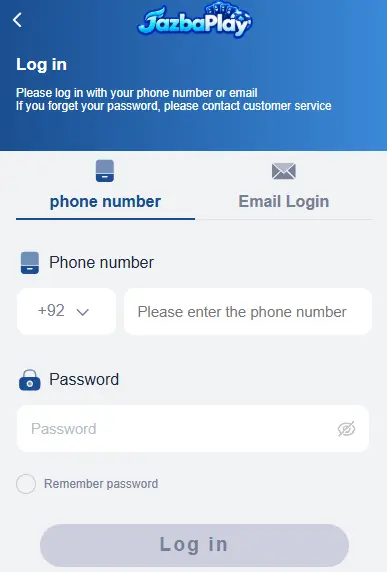
Methods to Log in to the JazbaPlay Game
1. Open the JazbaPlay Game Application
Launch the JazbaPlay Game APK on your Android smartphone or tablet.
2. Tap on the Login Option
Choose the “Login” button displayed on the homepage or main screen.
3. Enter Your Account Details
Carefully enter your registered mobile number and account password.
5. Access Your Dashboard
Tap the login button and allow a few moments for your account dashboard to open successfully.
Benefits of Regular Login on JazbaPlay Game
Daily Bonus Opportunities
Regular login activity may allow users to access promotional rewards and other bonus-related platform features.
Quick Access to New Features
Active users can remain informed about newly introduced games, special events, and application updates.
Better User Experience
Frequent use helps users become more comfortable with platform navigation and different gameplay systems.
Referral & Reward Participation
Users can track referral activity, promotional offers, and available reward sections more conveniently.
Improved Gameplay Familiarity
Common Login Problems & Solutions
| Login Issue | Possible Solution |
|---|---|
| Incorrect Password | Enter your password again carefully and check for any typing errors |
| Slow Login Loading | Check that your internet connection is stable before opening JazbaPlay |
| OTP Verification Delay | Wait briefly and request the verification code again if needed |
| App Not Opening | Restart the JazbaPlay application or install the latest APK version |
| Forgotten Password | Use the password recovery feature or contact customer support for assistance |
| Account Access Error | Confirm your registered mobile number and review your login information carefully |
Effective Tips for a Smooth Login on JazbaPlay Game -
- Enter your login information carefully before submitting the request
- Use a reliable internet connection for smoother account access
- Avoid unknown VPN services while signing in to your account
- Keep the JazbaPlay application updated to the latest APK version
- Clear unnecessary app cache if loading problems occur
- Avoid accessing your account from multiple unfamiliar devices
- Restart your smartphone if temporary login issues continue
- Use a strong password to improve account security and protection